
Guide Interactive retail spaces for WordPress
Create an Interactive Shopping Mall Map in WordPress
Turn existing mall floor plans into a connected visual directory. Visitors can choose a level, locate stores and services, open tenant details and browse the same locations in an HTML directory without leaving the page.
In short
- No custom map application required
- Managed directly in WordPress
- Built for connected levels, stores and facilities
Figure 1. A live shopping centre plan in WP InSpot. Selecting a store opens its own view, and the navigation bar leads back to the level above.
Static mall maps make visitors search twice
A static floor-plan PDF shows where units sit, but the store directory usually lives somewhere else. Visitors find a business in the list, return to the plan, identify the right level and search again for the unit number. On mobile, that back-and-forth becomes even harder.
WP InSpot connects the plan and the directory inside one WordPress experience. The visitor starts with the mall, chooses the relevant level and opens the location that matters without losing context.
Connect the mall overview, levels and tenants
Build a visual route that follows the structure of the shopping centre. The main plan can open a level. The level can reveal stores, restaurants, services and facilities. A selected location can open its details, link to a tenant page or lead into another workspace.
- Mall overview → level
- Level plan → store or facility
- Store → details, website, promotion or contact page
- Available unit → leasing information or enquiry
Breadcrumbs and back navigation preserve the route, so visitors can compare several locations without returning to the first screen after every click. The tutorials walk through connected views with nested workspaces step by step.
Make stores, dining and facilities clickable
Upload the floor plans and directory graphics you already use. Draw rectangular, circular or polygonal interactive zones (hotspots) over stores, food-court units, restrooms, elevators, customer-service points, entrances and parking connections.
Each zone can show a tooltip, popup, modal or side drawer. It can display text, open WordPress content, follow a link or lead into a nested workspace. Tenant pages can remain normal WordPress posts or custom post types instead of being copied into a separate map system.
Generate the store directory from the same locations
Some visitors begin with the floor plan. Others want an alphabetical or category-based list. WP InSpot can generate an optional HTML Table View from the actionable zones in the workspace, so the visual map and store directory use the same configured locations.
Every actionable store or facility zone can become a directory row, whether it opens a WordPress entity or post, displays text, follows a link or leads into a nested workspace. When no post or entity sits behind a zone, a column can use the zone’s own label, unit number or value.
Hovering a directory row highlights the corresponding location on the floor plan. Clicking the row triggers the same configured action as clicking the zone itself: it can open details, display a popup or drawer, visit a tenant page or move into another workspace.
The directory is server-rendered HTML, making store names, categories, levels and unit numbers readable to visitors and search engines instead of locking them inside a floor-plan image. Column sets can be assigned at workspace level, inherited by nested levels and overridden where one floor needs different information. Automatic synchronization with an external tenant system requires a separate integration. The documentation covers the WP InSpot Table View column keys and inheritance rules in full.
How to create an interactive shopping mall map in WordPress
- Add the floor plan. Create a workspace and choose the mall overview or level plan from the WordPress Media Library.
- Draw clickable locations. Mark stores, restaurants, services, entrances and facilities with shapes that match the plan.
- Connect each location. Open text, a WordPress tenant page, an external link, a popup, a drawer or another level workspace.
- Add Table View (optional). Generate the store directory from actionable zones, choose its columns and verify row-to-zone highlighting and actions.
- Publish and test. Add the workspace with the Gutenberg block or shortcode, then test the complete route on desktop, mobile and keyboard navigation.
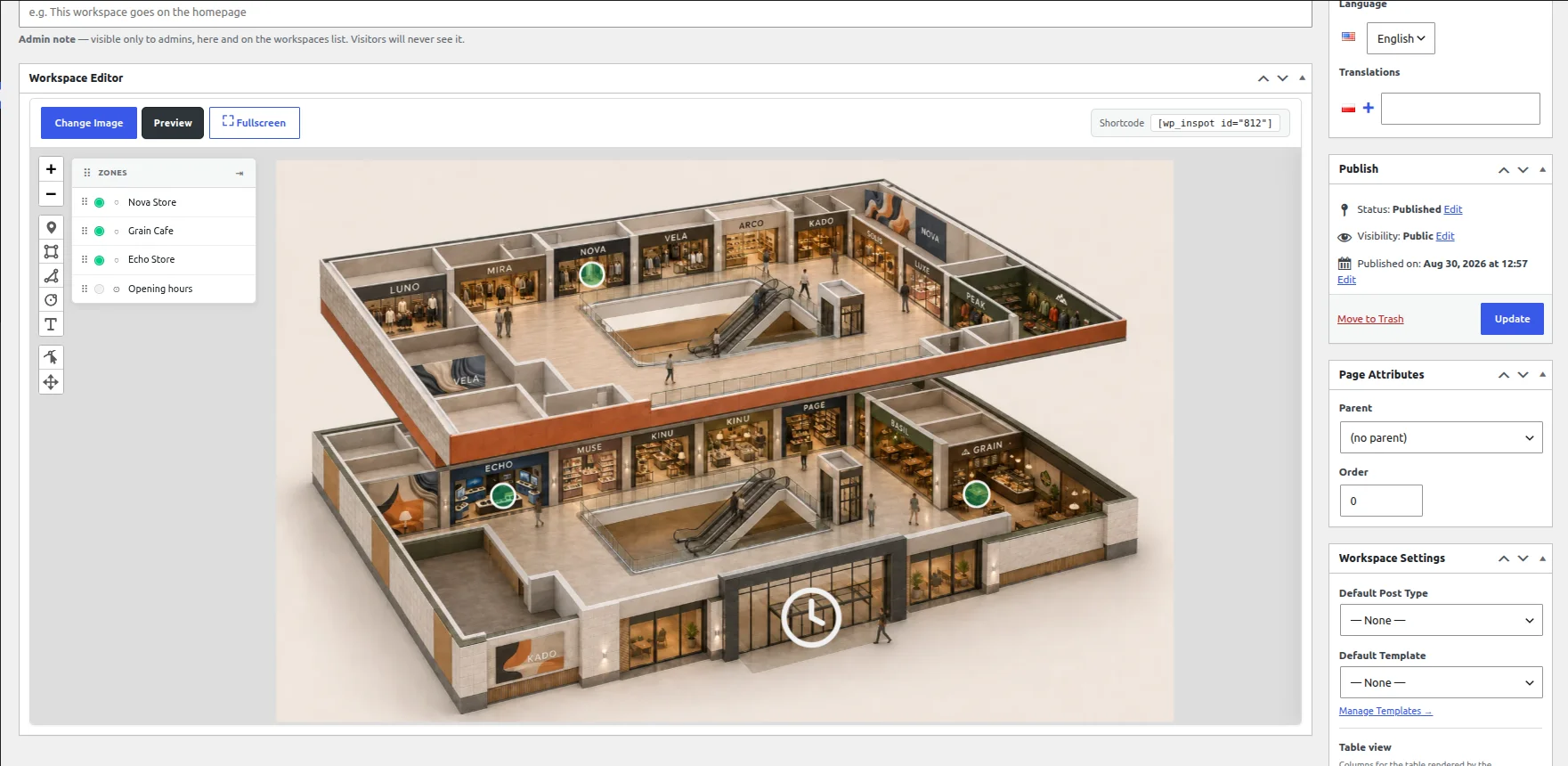
Figure 2. Every step of an interactive shopping mall map happens in wp-admin: zones are drawn on the plan, and each one is given the action it should run.
Built for shopping centre websites and retail teams
Public store directory
Help visitors find retailers, restaurants and services before arriving or while browsing the centre on mobile. Each location can expose the information that matters without forcing users to open a separate PDF.
Facilities and accessibility information
Mark accessible entrances, elevators, restrooms, family rooms, customer-service points, parking connections and other facilities directly on the relevant level.
Retail leasing presentation
Use a separate workspace to present available units, floor area, level, neighbouring tenants and enquiry links. This is a presentation layer for configured data, not an automatic leasing-management system.
WordPress agencies
Deliver interactive mall maps without rebuilding the same JavaScript directory for every retail property. Configure the experience around each client’s floor plans, tenant content and brand system.
More interactive image examples from other industries follow the same structure.
Why use WP InSpot instead of building a mall directory from scratch?
- The editor for clickable store and facility zones is already available inside WordPress.
- Connected levels, breadcrumbs and back navigation do not need to be rebuilt for each centre.
- The store directory can be generated from the same actionable zones as the map.
- Tenant pages can use existing WordPress content instead of a separate isolated database.
- Agencies can reuse the same production workflow across multiple retail properties.
Custom development remains appropriate when a project requires live indoor positioning, route calculation, kiosk hardware, advanced search or deep integration with an external property-management platform. WP InSpot is aimed at centres that need a professional interactive map and directory without building a separate application.
A lighter alternative to enterprise indoor wayfinding
Enterprise wayfinding platforms can provide live positioning, turn-by-turn routes, kiosk management and complex analytics. Those capabilities are valuable for large portfolios, but they also require specialist mapping, integrations and a larger implementation.
WP InSpot serves a simpler need: transform the floor plans and tenant content already available into an interactive, maintainable WordPress experience. It does not claim to calculate a visitor’s route or current indoor position.
| What you need | Where it belongs |
|---|---|
| A connected map and store directory built from the floor plans and tenant content you already have | WP InSpot, inside WordPress |
| Live indoor positioning, turn-by-turn routes, kiosk management and complex analytics | A dedicated wayfinding platform |
| Advanced search or deep integration with an external property-management system | Custom development or a separate integration |
Responsive and accessibility-conscious
Mall information is often checked on a phone, so level selection, store details and back navigation must remain understandable on smaller screens. Choose presentation modes that fit the available space and test the real tenant content at representative widths.
Use clear zone labels, visible keyboard focus and descriptive text for essential facilities. The HTML store directory provides a non-visual route to the same locations. WP InSpot supports accessibility-conscious implementation, but final WCAG conformance depends on the page design, content and testing of the complete website.
For agencies: keep the map inside WordPress
WP InSpot is managed from the WordPress admin rather than a separate hosted directory platform. Publish with a Gutenberg block or shortcode, connect locations to WordPress tenant content and style the presentation to match the shopping centre’s website.
For an agency, the delivery process becomes repeatable: prepare the floor plans, define levels and content fields, create tenant posts, draw zones, configure the directory and hand over a system the client can continue to maintain in WordPress. Multi-site licences are listed on the WP InSpot pricing page.
Frequently asked questions
How do I create an interactive shopping mall map in WordPress?
Create a WP InSpot workspace, upload the mall plan, draw zones over stores and facilities, then assign an action to each location. Connect levels with nested workspaces and publish the result with the Gutenberg block or shortcode.
Can the map show several mall levels?
Yes. A location or level selector can open another nested workspace. Breadcrumbs and back navigation preserve the visitor’s route between the mall overview, floor and store details.
Can WP InSpot generate a store directory?
Yes. Actionable zones can become rows in a server-rendered HTML Table View. Hovering a row highlights the corresponding location, while clicking it triggers the same action as the zone.
Can stores link to their own pages?
Yes. A store zone can open a WordPress post or custom post type, display text, follow an external link or open another workspace. This allows tenant content to remain part of the existing WordPress website.
Can the map include restrooms, elevators and parking access?
Yes. Facilities can be marked like any other zone and can show a label, description, accessibility information or related link.
Can it show available retail units?
Yes. A leasing workspace can present available units and configured attributes such as level, area and enquiry link. Automatic synchronization with an external leasing or property system requires a separate integration.
Does WP InSpot provide turn-by-turn indoor navigation?
No. WP InSpot creates interactive maps and connected directories from your own floor plans. Live indoor positioning, route calculation and kiosk management require a dedicated wayfinding platform or custom integration.
Is WP InSpot suitable for WordPress agencies?
Yes. Agencies can use it as a repeatable way to deliver interactive maps for shopping centres and retail properties without coding a new map interface for every website.
Turn your mall floor plan into a connected store directory
Use WP InSpot to connect mall levels, stores, dining and facilities directly inside WordPress. Start with the floor plans and tenant content you already have, then publish the first interactive workspace without custom development.
Read next: interactive hotel and resort maps, or the interactive image plugin for WordPress feature tour.